
Minecraft Sphere & Dome Generator
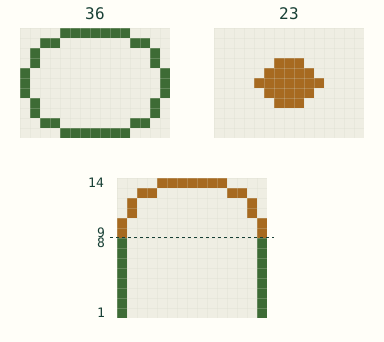
A hollow dome 21 blocks across and 11 high takes 569 blocks; a hollow sphere 15 blocks across takes 530. Both use a 1-block shell.
569Blocks
—As stacks
21 × 21 × 11Size (W × D × H)
11Layers
3D view
Layer 1 of 11
The 3D view loads when it comes into view. The layer chart has the full plan.
Build layer by layer
Open exported file
More formats
(?)
PNG shows the selected layer with row and column numbers, the size, the layer number and a center mark. TXT lists every layer from the bottom up, with the blocks to place in each row, and a link back to this plan. Checkmarks are not included.
SVG is the same picture as PNG and stays sharp at any size. Copy ASCII copies the selected layer as text: # is a block and . is an empty cell. With game coordinates on, TXT also gives the north-west corner and each row's world coordinates.
(?)
Structure files hold the whole shape in the block you choose, so a mod or a structure block can show or place it for you. They are made in your browser and never uploaded.
Java with the Litematica mod: put the .litematic file in the schematics folder inside your .minecraft folder. In the game, press M, choose Load Schematics, select the file and load it. It appears where you stand as a see-through guide to build along.
Bedrock: in a Creative world with cheats on, get a structure block with this command:
/give @s structure_block
Set the structure block to Load, press Import, choose the .mcstructure file, then press Load. Import is only on Windows. A structure block loads at most 64 × 64 blocks across and 384 high, and the empty cells keep whatever is already in your world.
Something not working? Send feedback
Tell us what you were trying to do and where you got stuck. Suggestions are welcome too.
Open email draftReview and send it in your email app. No email app? Write to support@sealmount.com in your webmail instead.
Screenshots and settings are optional; share only what helps explain the issue. How we handle your message.