
Minecraft Sphere & Dome Generator

A hollow dome 21 blocks across and 11 high takes 569 blocks; a hollow sphere 15 blocks across takes 530. Both use a 1-block shell.

Common sizes
Not perfectly round? Round
(?)

Hollow shells: 1–10 blocks thick for this size. Thickness counts blocks straight in from the outside. Solid fills every block and ignores thickness.

Want a flatter or taller dome? Round, 11 layers

Height follows the diameter: 11 layers make a round dome.

Already set some blocks aside? Not entered
(?)

Optional. Compare your stock with the full plan. Checkmarks do not consume or deduct stock. Enter a whole number of full blocks; crafting recipes are not included.

569Blocks
—As stacks
21 × 21 × 11Size (W × D × H)
11Layers

3D view

Layer 1 of 11

The 3D view loads when it comes into view. The layer chart has the full plan.

Build layer by layer

More formats
(?)

PNG shows the selected layer with row and column numbers, the size, the layer number and a center mark. TXT lists every layer from the bottom up, with the blocks to place in each row, and a link back to this plan. Checkmarks are not included.

SVG is the same picture as PNG and stays sharp at any size. Copy ASCII copies the selected layer as text: # is a block and . is an empty cell. With game coordinates on, TXT also gives the north-west corner and each row's world coordinates.

(?)

Structure files hold the whole shape in the block you choose, so a mod or a structure block can show or place it for you. They are made in your browser and never uploaded.

Java with the Litematica mod: put the .litematic file in the schematics folder inside your .minecraft folder. In the game, press M, choose Load Schematics, select the file and load it. It appears where you stand as a see-through guide to build along.

Bedrock: in a Creative world with cheats on, get a structure block with this command:

/give @s structure_block

Set the structure block to Load, press Import, choose the .mcstructure file, then press Load. Import is only on Windows. A structure block loads at most 64 × 64 blocks across and 384 high, and the empty cells keep whatever is already in your world.

Build layer by layer

of 11
    Building at exact game coordinates? Off
    (?)

    Use the north-west cell of the entire rectangular footprint: row 1, column 1, even if empty. This is not the first placed block or the circle center. East is +X; south is +Z. Choose each layer's Y level in game.

    Blocks to place Current row Checked row Outline of the layer below

    (?)

    Rows run north to south and columns west to east, both counted from 1, the same numbers as the row list. The small mark in the middle is the center. Faint squares show the layer below, so you can line up each new layer.

    Continuous runs · columns counted from the west edge (starting at 1).

      Rows in this layer

      0 of 21 rows checked
        (?)

        Checks stay in this browser for this exact shape and size. Clearing affects only the selected layer.

        About this tool and common questions

        Build spheres and domes layer by layer

        Choose a dome or a full sphere, set the diameter from 3 to 256 blocks, and follow the plan one layer at a time from the bottom. Each layer is a top-view chart with numbered rows and columns, and every row lists where to skip and where to place blocks. The 3D view shows how far you have come. All plans use full blocks.

        Worked example: a 15 × 11 oval tower and dome

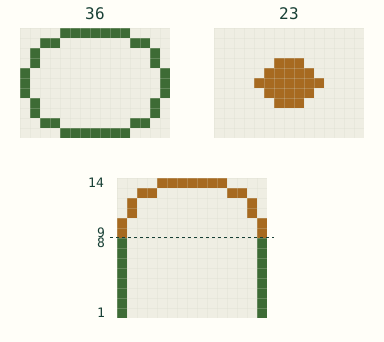
        Oval tower and dome: matching bottom ring, top cap and a center slice showing 8 tower layers below 6 dome layers.
        Top: the matching 36-block ring and the 23-block cap. Bottom: the center slice, with the tower in green and the dome in orange.
        Dome blocks, bottom to top
        LayersBlocks
        136
        236
        332
        432
        538
        623
        Dome197

        Use hollow walls and shell thickness 1. Build the 8-layer tower first, then place dome layer 1 above tower layer 8 with the same north-west corner. The sections occupy separate layers: 36 × 8 + 197 = 485 blocks over 14 layers, excluding floors, doors and decoration.

        Original model illustration; a planning example, not an in-game screenshot.

        How do I build a dome in Minecraft, layer by layer?

        Start with layer 1, the bottom ring. Row 1 is the north edge of the chart, and every “skip” is counted from the same west edge, so you can count along a straight line of blocks. Mark each row done as you place it. Then move one block up for the next layer and line it up with the faint outline of the layer below. The highlighted row on the chart and the orange layer in the 3D view show where you are.

        Checks stay in this browser for each exact shape and size, and the page reopens the last plan you worked on, so you can close it and continue later. To see the checks for another plan, choose its settings again or open its link.

        What is the difference between a sphere and a dome?

        A sphere is the whole ball, and its height normally equals its diameter. A dome is the top half of a ball, open at the bottom, so it can stand on the ground or on a wall. For an odd diameter, a dome whose height is half the diameter rounded up is exactly the top half of the sphere with that diameter.

        Why do some layers look thicker than the shell?

        Where the surface is nearly flat, near the top of a dome or the top and bottom of a sphere, neighboring layers differ in width by several blocks. Every block that touches the outside straight up, down or sideways stays in the shell, so these layers become wide rings and the very top becomes a solid cap. That keeps the shell watertight, with no gaps for water or mobs to slip through. Thickness always counts blocks straight in from the outside, never diagonally.

        How tall should a dome be?

        For a round dome, use half the diameter, rounded up: 11 layers for a dome 21 blocks across. That is what “Make it round” sets, and the height follows the diameter until you change it yourself. A lower height gives a flatter dome, like a shallow roof; a taller one gives a pointed, egg-like shape. With an oval footprint, the round height follows the shorter side.

        Can I put a dome on top of a round tower?

        Yes. The bottom layer of a dome has exactly the same outer edge as the Circle generator's circle of the same diameter, or its oval of the same width and depth, so it sits flush on a round tower wall. Plan the tower with the Circle generator, then build layer 1 of the dome directly on top of the wall.

        Open the Circle generator

        Does it work in Bedrock and Java?

        Yes. The plan is a building guide for full blocks, which work the same in Minecraft Java and Bedrock Edition, and it needs no mods. The generator runs in your browser and does not connect to your world, so you place every block yourself.

        To skip the hand placing, open “More formats” and download a .litematic file for the Litematica mod (Java) or a .mcstructure file for a Bedrock structure block.

        How does the generator choose the blocks?

        A block belongs to the shape when the center of its cube lies inside the sphere or dome you chose, which is stretched into an oval shape when the height or depth differs from the diameter. A hollow shell keeps the blocks that are within the chosen thickness of the outside, counted through block faces. Solid keeps every block inside.

        How these calculations are checked

        Does this use the Minecraft trademark?

        The word describes the game the blueprint is for. Sealmount is an independent fan-made tool, not an official Minecraft service. It is not approved by or associated with Mojang or Microsoft.

        Help

        A little help goes both ways.

        Hi, I’m Monty. Need a hand?

        Pick the right tool, find an answer on this page, or tell us what went wrong.

        Not sure which tool you need?

        Still stuck?

        Report a bug or share an idea with the Sealmount community.

        Join on Discord

        Discord account needed. Verification may be required.

        Prefer email?Email support
        More contact options